
When navigating ViewPoint, there are three filters you can use to view your data:
- Disciplines
- Region/Site
- Date
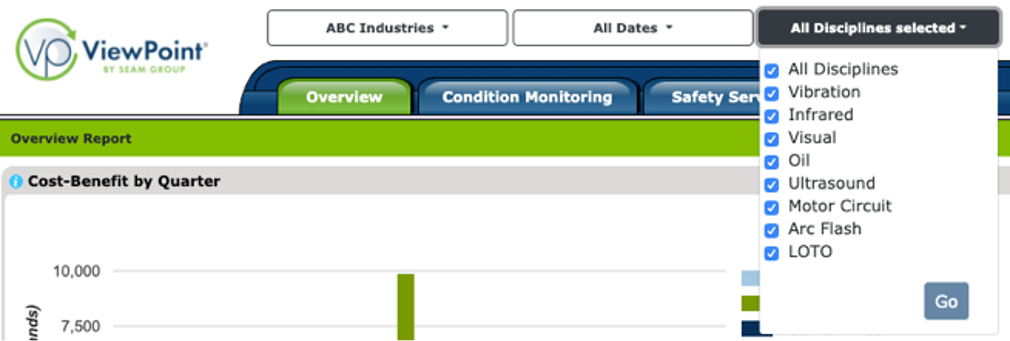
Disciplines: these are the services completed and being reported
- ViewPoint defaults to view All Disciplines on the home page
- Select or deselect each discipline to filter the information you would like to see
- ViewPoint features integrated reporting and analysis for all disciplines
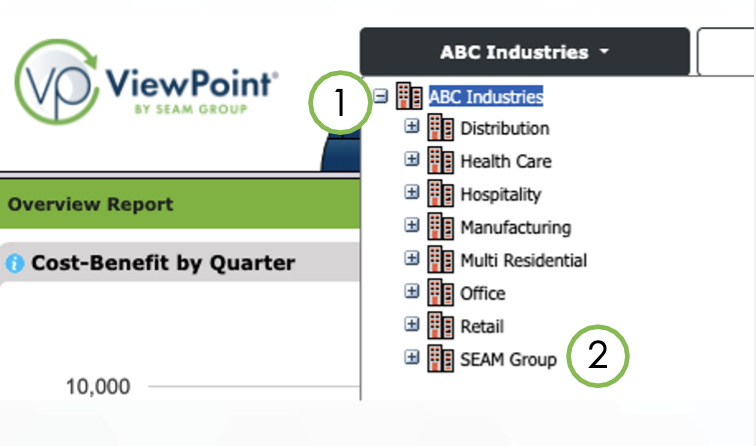
Region/Site: use this filter to limit displayed information to a region or individual site
- Click on the region/site filter button
- Expand or collapse regions and sites by clicking on the plus and minus icons (1)
- Click on an item to apply the filter (2)
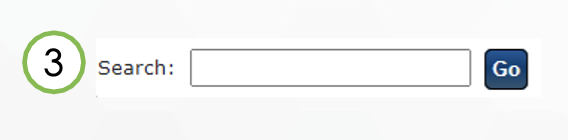
- You may also search for a site or region by name (3)
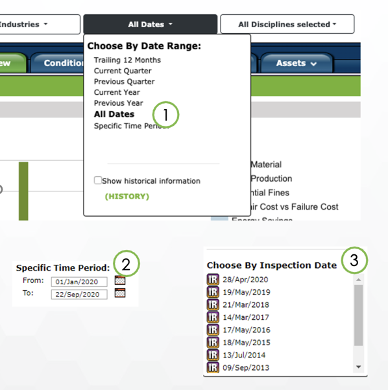
Date: use this filter to limit view data for a specific date range
- Click on the date filter button
- Choose a preset date range from the list, or All Dates to see everything (1)
- If you'd like to see a specific date range, select Specific Time Period (2)
- A list of inspection dates is available if you have chosen a single site in the region/site filter (3)
If you need further assistance, please email us at vphelp@seamgroup.com
Comments
0 comments
Please sign in to leave a comment.